LED and Resistor Basics
In this lesson, we will learn about two very important electronic components: the LED and the resistor. We will also build our first simple circuit on a breadboard.
In this lesson, we will learn about two very important electronic components: the LED and the resistor. We will also build our first simple circuit on a breadboard.
By the end of this lesson, you will understand:
- 💡 What an LED is
- 🔌 LED polarity
- 🟫 What a resistor is
- ⚡ Why an LED needs a resistor
- 🔋 How to connect an LED to a battery
- 💡 How to build an LED glowing circuit
- 🔘 How to control an LED using a push button
What Is an LED?
LED stands for Light Emitting Diode.
An LED is an electronic component that produces light when electric current flows through it in the correct direction.
LEDs are used in many places, including:
- Indicator lights
- Displays
- Toys
- Electronic devices
- Decorative lighting
- Traffic signals
- Arduino and robotics projects
LEDs are available in many colors, such as:
- 🔴 Red
- 🟢 Green
- 🔵 Blue
- 🟡 Yellow
- ⚪ White
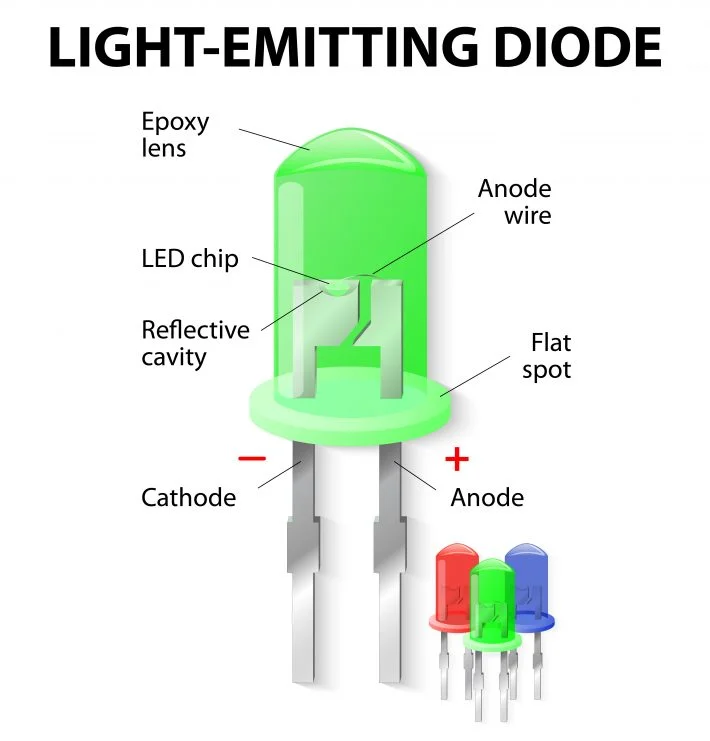
An LED has two terminals:
- Anode (+)
- Cathode (−)
Longer leg → Anode (+)
Shorter leg → Cathode (−)
What Is a Resistor?
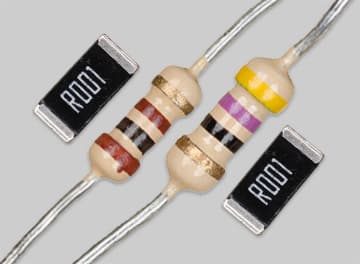
A resistor is an electronic component that provides resistance in a circuit.
Resistance opposes the flow of electric current.
The unit of resistance is:
Ohm (Ω)
Common resistor values include:
- 100 Ω
- 220 Ω
- 330 Ω
- 1 kΩ
- 10 kΩ
A resistor is commonly represented by:
────/\/\/\/────
or using the rectangular IEC symbol:
────[ R ]────
Project 1 — LED Glowing on a Breadboard
Objective
Build a simple circuit that makes an LED glow using a battery, resistor, and breadboard.
Components Required
- 1 × Breadboard
- 1 × LED
- 1 × 220 Ω or 330 Ω resistor
- 1 × Low-voltage battery/power source
- Jumper wires
Step-by-step
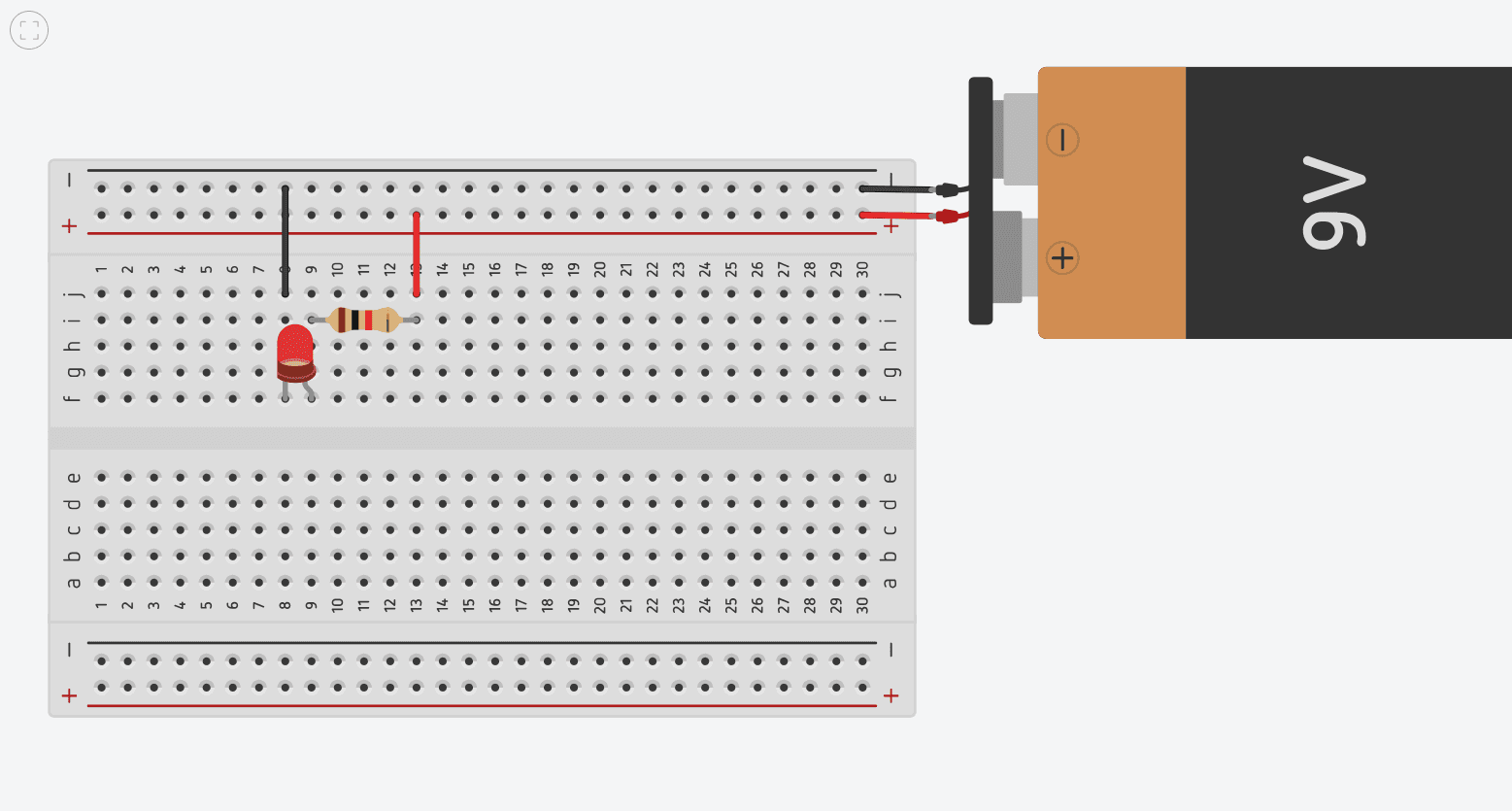
Step 1: Connect the positive terminal of the battery/power supply to the breadboard's positive rail.
Step 2: Connect the negative terminal to the negative rail.
Step 3: Insert the resistor into the breadboard.
Step 4: Connect one side of the resistor to the positive rail.
Step 5: Connect the other side of the resistor to the LED's anode.
Step 6: Connect the LED's cathode to the negative rail.
Step 7: Turn on/connect the power.
The LED should glow. 💡
Circuit Diagram
Project 2 — LED ON/OFF Using a Push Button
Now let's add the push button we learned about in Lesson 2.
Our goal is:
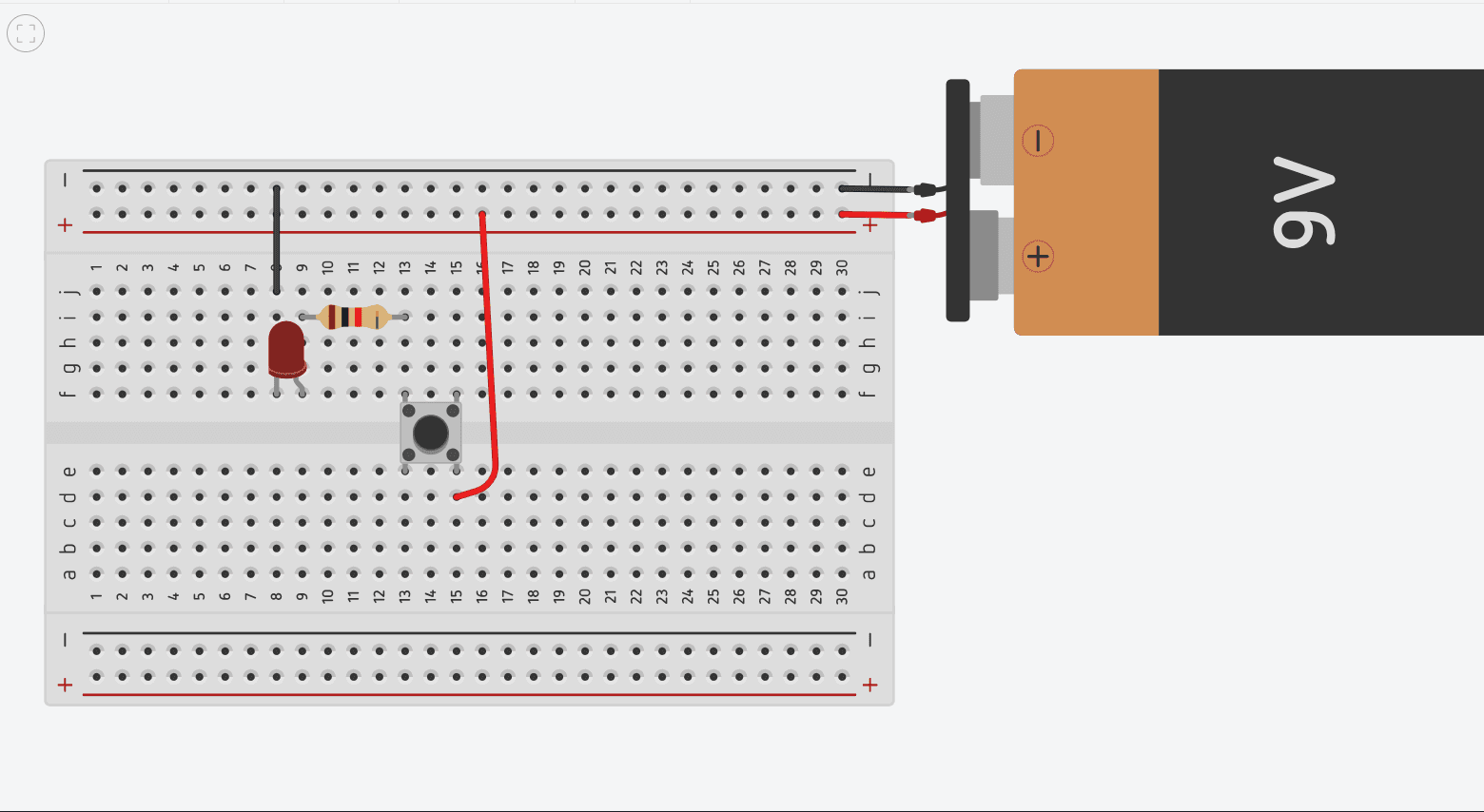
Press the button → LED ON
Release the button → LED OFF
Components Required
- Breadboard
- LED
- 220 Ω or 330 Ω resistor
- Push button
- Battery/power source
- Jumper wires
Circuit Diagram
Step-by-Step
Step 1
Connect the positive side of the battery to one side of the push button.
Step 2
Connect the other side of the push button to the resistor.
Step 3
Connect the resistor to the LED's anode.
Step 4
Connect the LED's cathode to the negative side of the battery.
What You Learned
In this lesson, you learned:
- 💡 An LED is a Light Emitting Diode.
- 🔌 LEDs have polarity.
- ➕ The longer LED leg is normally the anode.
- ➖ The shorter leg is normally the cathode.
- 🟫 A resistor provides resistance and limits current.
- ⚡ An LED normally needs appropriate current limiting.
- 🔌 A breadboard allows us to build circuits without soldering.
- 🔘 A push button can control whether a circuit is complete.
- 💡 You built your first LED circuit.
- 🔘 You built an LED ON/OFF circuit using a push button.